Guides
Smart Contracts with Anvil API#
Introduction#
The Anvil API provides a comprehensive suite of tools for working with Cardano smart contracts, offering a streamlined experience for developers to deploy, interact with, and manage smart contracts without dealing with the underlying complexity of the Cardano blockchain.
Prerequisites: This guide assumes familiarity with basic Cardano concepts and smart contract development principles. If you're new to Cardano smart contracts, we recommend reviewing Aiken Fundamentals - EUTxO before proceeding.
Where Anvil Fits in the Cardano Smart Contract Ecosystem#
Smart contract development and usage follows a lifecycle from code to on-chain interaction. The diagram below illustrates where Anvil API fits in this process:
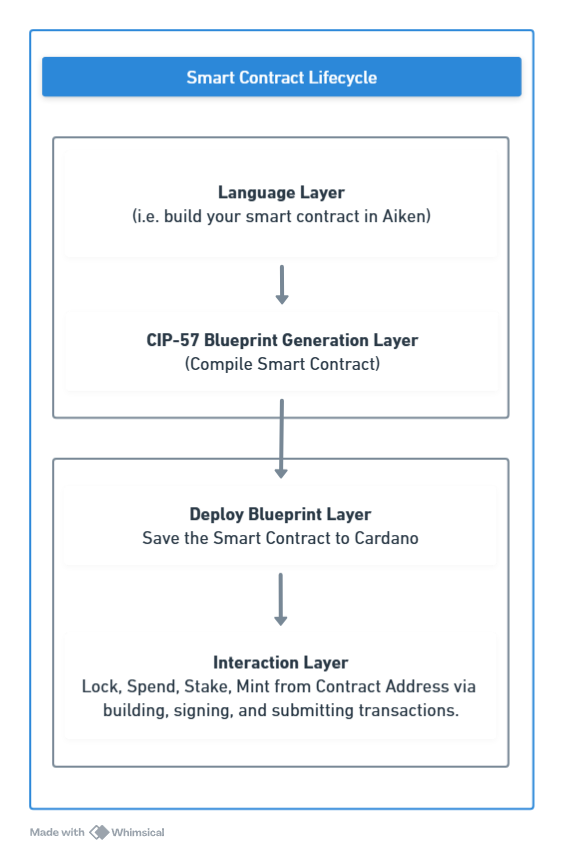
As shown in the diagram, Anvil API comes into play after you've written and compiled your smart contract code with Aiken. Our tools focus on:
- Blueprint Management: Storing and managing your compiled smart contract blueprints
- Deployment: Saving your contracts to the Cardano blockchain
- Transaction Building: Creating the simple or complex transactions needed to interact with contracts
- Script Execution: Handling the validation and execution logic upon submit
This clear separation of concerns allows you to focus on writing high-quality contract logic while Anvil handles the complexities of blockchain interaction.
CIP-57 Blueprint Format#
The Anvil API works with CIP-57 Plutus Blueprint format, which provides a standardized way to describe Cardano smart contracts.
Blueprint Generation with Aiken#
Aiken is the recommended smart contract language for Anvil API. It generates CIP-57 compliant blueprints automatically when you build your project:
# Generate CIP-57 blueprint file with verbose output for debugging
aiken build --verbose
The build process creates a plutus.json file in your project's build directory, which is a complete CIP-57 blueprint that can be directly used with the Anvil API. Using the --verbose flag will provide detailed compilation information and help with debugging.
Once you have your blueprint file, you can use the Anvil API to manage and interact with your smart contracts without having to deal with the low-level details of the Cardano blockchain.
Working with Smart Contracts#
Once you have your blueprint file, you can use the Anvil API to manage and interact with your smart contracts. The Anvil API provides several ways to work with Cardano smart contracts:
Validator Types and Script Purposes#
Cardano smart contracts use validators to define the conditions under which certain operations can occur. Understanding validator types is essential for implementing effective smart contracts.
Blueprint Management#
Learn how to store, retrieve, update, and delete your CIP-57 blueprints using the Anvil API.
Example Smart Contract Interactions#
To help you get started with smart contracts on Cardano, we provide several example implementations:
Hello World Smart Contract#
A simple smart contract example to help you understand the basics.
Minting Tokens with Smart Contracts#
Learn how to create and manage tokens using mint validators.
Mint with Smart ContractSimple Smart Contract - Time-locked minting with authorized signer
Escrow Smart Contract#
A complete end-to-end example implementing an escrow system with Next.js, Weld, and Blockfrost Webhooks for real-time updates.