Guides
CIP-68 Standard Reference#
This page provides detailed technical information about the CIP-68 standard for developers implementing CIP-68 tokens.
Token Relationship Overview#
CIP-68 Dual-Token Model#
CIP-68 uses a dual-token system where each NFT consists of two linked tokens:
- 🏷️ Reference Token (label 100): Contains the metadata and lives at a script address. This is the "data storage" token that can be updated by the creator.
- 🎨 User Token (label 222): The actual NFT that users own and trade. This token inherits its metadata from the Reference Token.
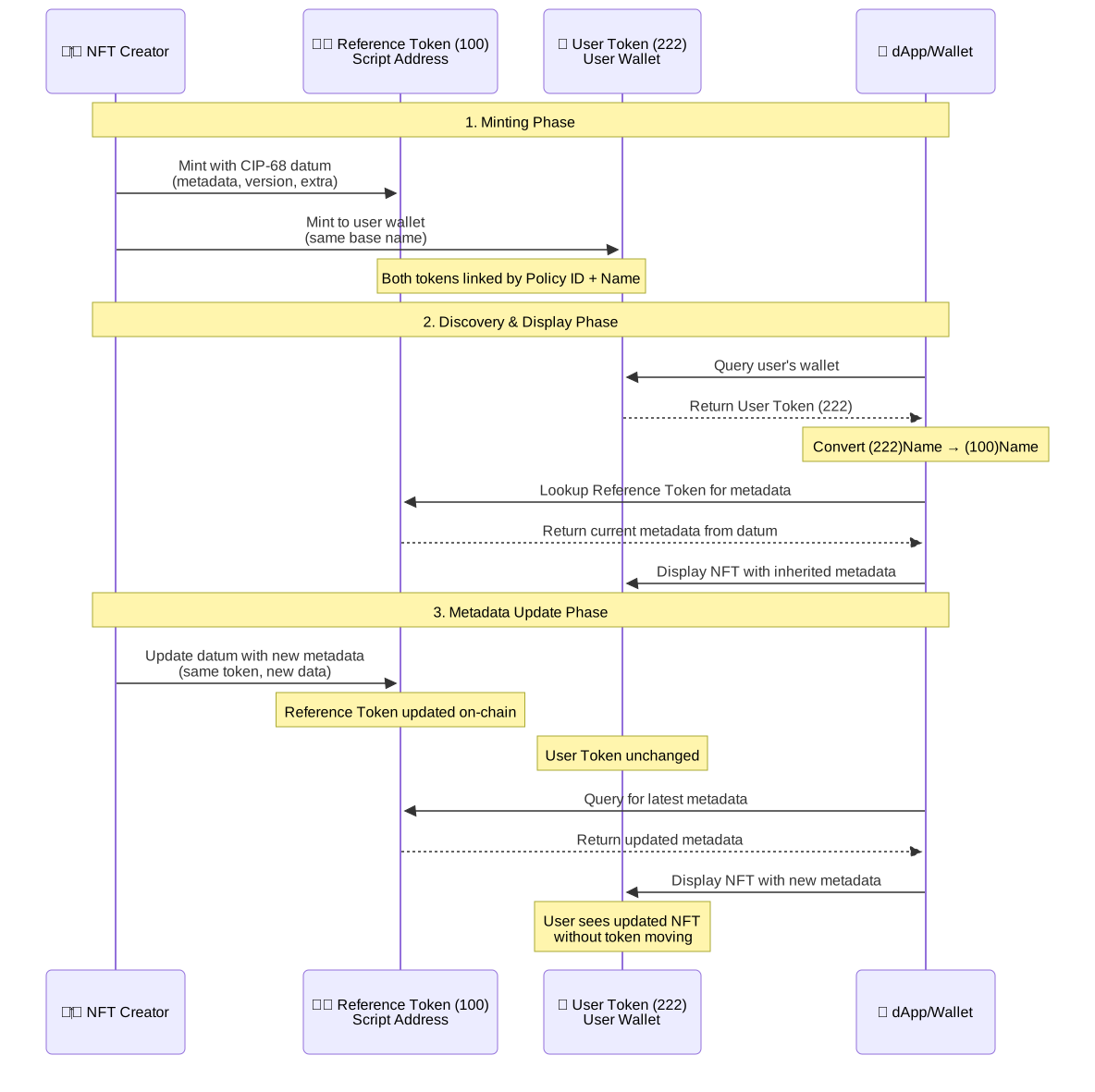
Both tokens share the same Policy ID and base asset name, but have different label prefixes. When dApps need to display an NFT, they:
- Find the User Token (222) in the user's wallet
- Derive the Reference Token name by converting
(222)Name → (100)Name - Query the blockchain for the Reference Token to get current metadata
- Display the NFT with the inherited metadata
Token Lifecycle Workflow#
Datum Structure#
CIP-68 tokens use a standardized datum structure: [metadata, version, extra]
metadata: CIP-25 compatible metadata (name, image, description, etc.)version: Integer version field indicating supported token standards:- Version 1: NFTs (222) and Fungible Tokens (333)
- Version 2: Rich Fungible Tokens (444) - fractionalized NFTs
- Version 3: Reserved for future token standards
extra: Optional custom Plutus data for application-specific use
The version field enables different token types and maintains backward compatibility. Higher versions support all features from lower versions.
Recommended Tool: Meta Draft
For creating and validating CIP-68 metadata, we recommend using Meta Draft - a free metadata validation tool built specifically for Cardano. It provides a complete 4-step workflow to create consistent metadata for your collection:
1. Metadata Structure - Define your collection's JSON structure with consistent formatting 2. Rules Selection - Choose from 23+ validation rules to prevent common errors:
- Duplicate detection (names, images, asset names)
- Key formatting (camelCase, snake_case, Title Case)
- Required fields validation (name, image)
- Character limits and data type validation
- Attribute consistency checks
3. NFTs Data Validation - Validate each NFT against your selected rules 4. Summary & Export - Review and export your validated metadata as JSON
Perfect for CIP-68 Collections:
- Prevents minting errors by catching issues before blockchain deployment
- Ensures consistency across your entire collection
Token Labels (CIP-67 Encoding)#
CIP-68 uses labels to identify token purposes:
| Token Type | Label | Hex Prefix | Purpose |
|---|---|---|---|
| Reference Token | 100 | 000643b0 |
Holds metadata, locked at script address |
| User Token | 222 | 000de140 |
Actual NFT in user's wallet |
Anvil Handles Label Encoding Automatically
Anvil automatically handles CIP-68 label encoding when you specify the label field:
{
  "assetName": { "name": "mytoken", "format": "utf8", "label": 100 },
  // Anvil converts this to: "000643b0" + hex("mytoken")
}
label: 100→ Anvil prefixes with000643b0(Reference Token)label: 222→ Anvil prefixes with000de140(User Token)format: "utf8"→ Anvil converts the name to hex automaticallyformat: "hex"→ Anvil uses the name as-is (already hex encoded)
This ensures proper CIP-68 compliance without manual hex encoding.
Supported URI Schemes for Metadata#
Per the official CIP-68 specification, these URI schemes are supported for metadata images and files:
https://- Standard web URLs (e.g.,https://example.com/image.png)ipfs://- IPFS content addressing (e.g.,ipfs://QmHash...)ar://- Arweave permanent storage (e.g.,ar://TransactionId)data:- RFC2397 on-chain data URLs (e.g.,data:image/png;base64,iVBOR...)
Best Practices#
- Use IPFS for decentralized, content-addressed storage
- Use Arweave for permanent, immutable storage
- Use HTTPS only for trusted, long-term available sources
- Use data URLs sparingly due to transaction size limits
Transaction Payload Structure#
Here's the basic structure for minting CIP-68 tokens with Anvil:
{
  // Customer wallet address receive any leftover UTxOs from the transaction.
  "changeAddress": "addr_test1...",

  // UTXOs from the customer wallet paying for fees (list of CBOR UTXOs)
  "utxos": ["8282...", "8282..."],

  "mint": [
    {
      // Reference Token - Label 100 -> Sent to Metadata Manager Wallet or Script Address
      "version": "cip68",
      //Name of the asset. Must be the same for both tokens
      "assetName": { "name": "youruniquecip68asset", "format": "utf8", "label": 100 },
      "metadata": {
        "name": "Your NFT Name",
        "image": "ipfs://your-image-hash",
        "description": "Your NFT description",
        "mediaType": "image/png"
      },
      "policyId": "8e024681ee83f54bd5f9a0334641...",
      "quantity": 1,
      "destAddress": "addr_test1..."
    },
    {
      // User Token - Label 222 -> Sent to User Wallet
      "version": "cip68",
      // Asset name must be identical to the (100) token's assetName
      "assetName": { "name": "youruniquecip68asset", "format": "utf8", "label": 222 },
      "policyId": "8e024681ee83f54bd5f9a0334641...",
      "quantity": 1,
      "destAddress": "addr_test1..."
    }
  ],

  // The `preloadedScripts` array provides script data for minting authorization.
  // - Native scripts: contains the actual native script
  // - Plutus scripts: contains blueprint data (native script derived from blueprint)
  // Optional but recommended for performance and latency. Required for new/unregistered scripts.
  "preloadedScripts": [ /* ... script details ... */ ],

  // The `scriptInteractions` array is ONLY required for smart contract validation.
  // It is not used for the native script / Metadata-Manager Wallet approach.
  // It is ONLY required for blueprints that are not registered yet.
  // The full payload format is covered in the smart contract guide.
  "scriptInteractions": [ /* ... validator, redeemer, datum ... */ ],
}